
Best Freezer Alarm with App and WiFi: Smart Choices in 2024

Listen up, folks! If you’re serious about keeping your food fresh and safe for consumption, you need a freezer alarm. These bad boys monitor the temperature in your freezer and let you know if things start to get too hot (or too cold, for that matter).
But we’re not talking about your grandma’s freezer alarm here. Oh no, we’ve got some high-tech stuff now with app and Wi-Fi connectivity. That’s right, you can monitor your freezer’s temperature from your phone!
These fancy freezer alarms give you real-time updates and notifications, so you can rest easy knowing your food is staying at the perfect temperature. And let’s be real, this isn’t just for home use. This is for all you food industry folks out there who need to keep things on lock for quality control.
When choosing a freezer alarm with app and Wi-Fi connectivity, make sure to consider factors like accuracy, ease of installation, battery life, and compatibility with your phone. And hey, if you’re feeling fancy, go ahead and splurge on one that can track multiple locations or integrate with your other smart devices.
We’ve done the hard work for you and tested the best freezer alarms with app and Wi-Fi connectivity. So go ahead, keep your cool, and let these alarms do the work for you!
Best freezer alarms with an app and WiFi
Explore our curated list of the best freezer alarms with app and WiFi capabilities to monitor your freezer’s temperature, ensuring your food remains safe and fresh.
First, here is a handy table with all of our recommendations in one place!
| Product Image | Product Name / Primary Rating / Price | Primary Button |
|---|---|---|
|
|
||
|
|
|
|
|
|
|
|
|
|
|
|
|
|
|
|
|
|
|
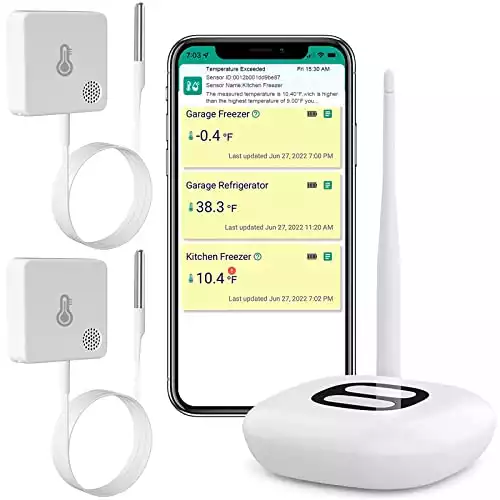
MOCREO ST5 WiFi Thermometer Freezer Alarm
This MOCREO ST5 WiFi Thermometer Freezer Alarm is a reliable and efficient choice for monitoring your freezer temperature remotely.
Pros
- Real-time temperature monitoring with app and email notifications
- Easy setup with a user-friendly app
- Thin and flexible probe cable for easy installation
Cons
- Does not support 5Ghz WiFi connections
- Up to 40 meters range between Hub and Sensor
- Initial pairing of sensors can be challenging
The MOCREO ST5 WiFi Thermometer Freezer Alarm offers 24/7 real-time monitoring for your freezer, allowing you to keep track of temperature changes and receive alerts when the temperature falls out of the desired range. With the MOCREO app, you can customize instant alarms and receive email alerts and push notifications to your phone, giving you peace of mind whether you’re at home or on the go.
One of the standout features of the ST5 is its thin and flexible probe cable. At only 1.3mm thick, it can easily fit through the door seal of your freezer without causing damage or affecting the seal’s performance. This makes installation hassle-free and unobtrusive.
The ST5 also offers data storage and export capabilities for in-depth analysis and research. The built-in rechargeable battery can last up to 2 years on a single charge, and there is a low battery alarm when the battery level drops below 10%. However, keep in mind that the ST5 only supports 2.4GHz WiFi connections and the range between Hub and Sensor is limited to 40 meters without obstructions.
The MOCREO ST5 WiFi Thermometer Freezer Alarm is an excellent option for remotely monitoring your freezer’s temperature and receiving instant notifications. Its ease of use and precision make it an ideal choice for residential and commercial applications alike.
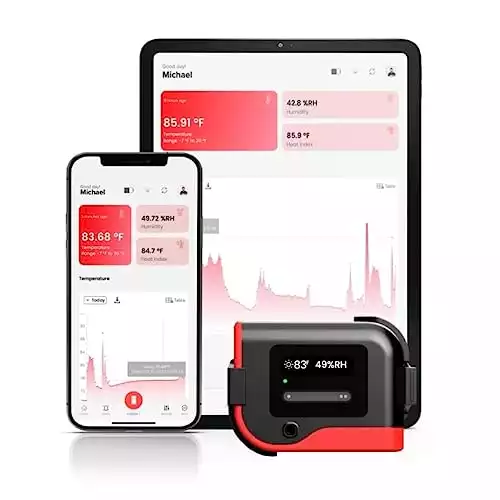
TempCube Pro WiFi Temperature & Humidity Monitor
The TempCube Pro is a reliable and user-friendly choice for monitoring temperature and humidity in various spaces, especially for those who prefer no monthly fees.
Pros
- Real-time alerts with no subscription
- Highly accurate Swiss-made sensor
- Versatile for multiple applications
Cons
- Requires 2.4GHz WiFi network
- May need frequent recharging
- Limited to 100 days of battery life on a single charge
You just set up your TempCube Pro WiFi Temperature & Humidity Monitor, and you’re already impressed by the easy installation and real-time alerts sent to your phone. The device connects seamlessly to your 2.4GHz WiFi network and is equipped with rechargeable batteries, which can last up to 100 days on a single charge, ensuring you have a dependable way to monitor your environment.
As you use the TempCube Pro, you find it particularly helpful in various applications, from monitoring greenhouses and wine cellars to server rooms and vacation homes. The Swiss-made sensor provides highly accurate readings, ensuring your spaces are maintained at optimal temperature and humidity levels. A helpful bonus – you don’t need to worry about any subscription or monthly fees when using this device.
However, you might encounter some downsides, such as the reliance on a 2.4GHz WiFi network or the potentially frequent recharging times. Despite this, the benefits significantly outweigh these drawbacks. The device offers a convenient data storage and export feature, which allows you to track and download up to 90 days of historical data for free.
Overall, the TempCube Pro WiFi Temperature & Humidity Monitor offers a solid solution for those in need of remote environmental monitoring without recurring fees. Its versatile applications, accurate sensors, and robust functionality make it a valuable investment for maintaining ideal conditions in multiple settings.
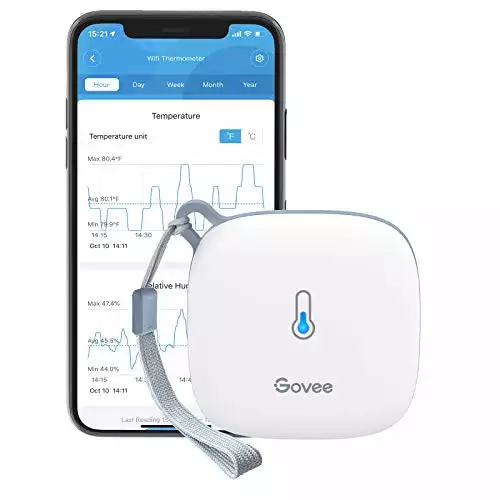
Govee WiFi Thermometer Hygrometer H5179
The Govee WiFi Thermometer Hygrometer H5179 is a reliable and accurate choice for monitoring temperature and humidity in various environments.
Pros
- Real-time monitoring through WiFi and Bluetooth connection
- Fast and accurate Swiss-made sensor
- Alert function to notify you when temperature and humidity go beyond a given range
Cons
- Does not support 5G WiFi
- Alert function only supports Bluetooth settings
- Free data storage for only 20 days with up to 2 years’ worth of exportable data
The Govee WiFi Thermometer Hygrometer H5179, equipped with a Swiss-made sensor, provides precise temperature and humidity readings in real-time. By connecting through WiFi and Bluetooth via the Govee Home app, you can easily monitor the changes in your environment, making it ideal for basements, greenhouses, and wine cellars.
One of its best features is the alert function which allows you to set preset temperature and humidity ranges and receive a notification as soon as the levels fall outside of that range. This feature works only through Bluetooth settings, so make sure your device is connected properly. The thermometer also offers free data storage and allows you to export up to 2 years’ worth of data, giving you insights into historical trends and graphs.
The Govee WiFi Thermometer Hygrometer H5179 is easy to place using the included lanyard loop. However, be aware that it does not support 5G WiFi and comes with only 20 days of online data storage. Overall, this device is a great investment for those looking to remotely monitor temperature and humidity with an accurate sensor and a user-friendly app.
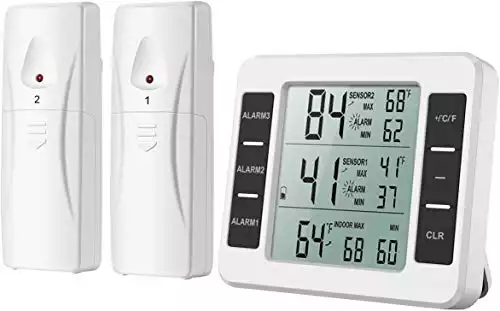
AMIR Refrigerator Thermometer
The AMIR Refrigerator Thermometer offers effective temperature monitoring and alarms to enhance proper food storage in your fridge or freezer.
Pros
- Wide temperature range for indoor and outdoor use
- Audio and visual alarms with customizable settings
- Easy-to-read display and records for historical temperature readings
Cons
- Signal interference with other devices is possible
- Shorter battery life of around six months
- Remote sender might not work if placed directly on contents inside the freezer
The AMIR Refrigerator Thermometer is a user-friendly wireless thermometer that allows you to monitor the temperature in your fridge, freezer, or even outdoors. With a temperature range of -10°C to 60°C (14°F to 140°F) for indoor use and -40°C to 60°C (-40°F to 140°F) for outdoor use, this device ensures that your food storage remains safe and within appropriate temperature limits.
One of the standout features of the AMIR Refrigerator Thermometer is the audio and visual alarm system. You can set up pre-determined minimum and maximum alarm settings, so when the temperature goes beyond these limits, you will be immediately notified. This is especially helpful in preventing spoilage and ensuring food safety.
The easy-to-read LCD screen displays large digits for quick monitoring. It’s also capable of recording minimum and maximum temperatures, providing historical data for better insights into your refrigerator or freezer’s performance. This wireless thermometer is versatile in terms of installation, with the display unit capable of standing on a table, hanging on a wall, or being magnetized to a refrigerator.
However, there are a few downsides to this product. The signal might experience interference when in close proximity to other devices. Moreover, the battery life seems to be relatively short, lasting around six months. Lastly, the remote sender may not work well if placed directly on top of the contents inside a freezer, so finding the ideal position for the sensor could take some trial and error.
Despite these drawbacks, the AMIR Refrigerator Thermometer is still a valuable investment if you’re looking for an efficient way to maintain proper food storage conditions and avoid potential food spoilage.
SENCKIT WiFi Temperature Sensor
Choose the SENCKIT WiFi Temperature Sensor for reliable remote temperature monitoring and app-enabled alerts for your freezer or fridge.
Pros
- Remote temperature monitoring with app
- Waterproof external probe for stable connection
- Built-in rechargeable backup battery
Cons
- Low temperature alarm threshold
- Exclusively supports 2.4GHz Wi-Fi networks
- Occasional sync issues
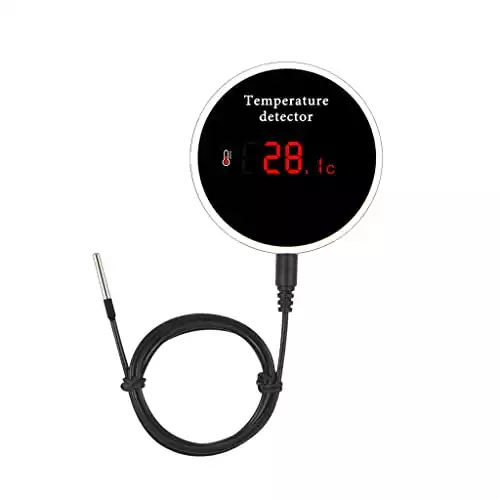
The SENCKIT WiFi Temperature Sensor offers smart temperature monitoring with real-time data updates for your freezer, refrigerator, or even a fish tank. The device connects to a 2.4GHz Wi-Fi network, allowing you to monitor temperature data remotely through the Tuya/Smart life app. It has a waterproof external probe that ensures a stable connection and accurate measurements, even in wet conditions.
One of the standout features of this device is its built-in rechargeable backup battery. When the power goes out, you won’t have to worry about losing temperature monitoring capability, as the battery provides up to 6 hours of backup power. Additionally, the magnet on the back of the device makes it easy to install on any metal surface.
However, some users have reported that the low-temperature alarm is not as sensitive as it should be, and the device may require a temperature drop of up to 40 degrees before triggering an alert. Additionally, the SENCKIT WiFi Temperature Sensor only supports 2.4GHz Wi-Fi networks, which may limit its compatibility for some users. Some users also mentioned occasional sync issues between the device and the app.
The SENCKIT WiFi Temperature Sensor is a reliable and convenient solution for monitoring freezer or fridge temperature, but it may not be the best option for those looking for a highly responsive alarm system or compatibility with various Wi-Fi networks. Despite these drawbacks, its real-time remote monitoring capabilities, waterproof probe, and built-in rechargeable battery make it worth considering.
YoLink Smart Wireless Temperature/Humidity Sensor
The YoLink Smart Wireless Temperature/Humidity Sensor is a reliable solution for monitoring your freezer’s temperature and humidity, ensuring optimal performance.
Pros
- Exceptionally long range with a unique LoRa-based technology
- Easy setup with direct ethernet connection or Wi-Fi hotspot mode
- Flexible notifcation options including texts, emails, and push alerts
Cons
- Requires AAA batteries for operation
- May depend on the phone manufacturer for phone-specific features
- Limited number of free SMS notifications
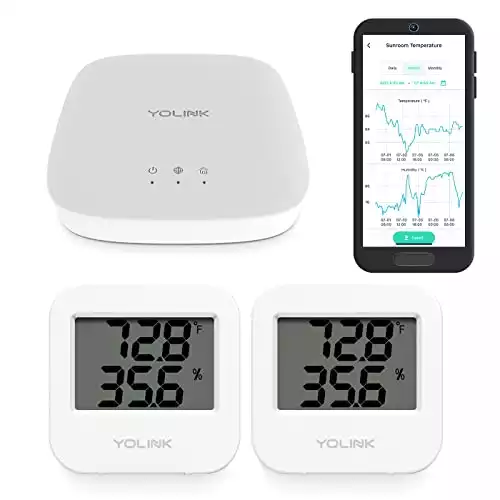
When it comes to monitoring the temperature and humidity of your freezer, you can confidently rely on the YoLink Smart Wireless Temperature/Humidity Sensor. It comes with an unprecedented long-range connectivity feature, that uses unique LoRa-based technology, allowing it to work even in challenging conditions such as outdoors, other floors, or inside a metal box like a fridge.
Setting up this device is a breeze, as you can either connect it directly to your router or use its wireless hotspot mode. The accompanying app allows you to personalize your notifications, making it easy for you to get instant alerts in various forms such as texts, emails, and push notifications.
Unfortunately, this sensor requires AAA batteries for operation, adding to your long-term costs. Moreover, some phone-specific features may depend on the manufacturer of your smartphone. And for those who expect frequent alerts, be aware that there is a limited number of free SMS notifications per month.
Overall, the YoLink Smart Wireless Temperature/Humidity Sensor is an excellent investment for those looking to maintain optimal conditions in their freezer. Its ease of use, impressive connectivity range, and customizable notifications make it a must-have for monitoring your freezer’s performance.
Buyer’s guide for freezer alarms – what to look for
When choosing the best freezer alarm with app and WiFi capabilities, there are several key features to consider. This buying guide will help you make an informed decision based on your needs and preferences.
- Consider the connectivity options available, such as WiFi, to receive real-time updates and alerts on your smartphone or tablet.
- Choose a model with a strong and reliable signal that can effectively communicate with your home’s WiFi network, especially if your freezer is located in the basement or garage.
- Look for a high-quality freezer alarm that can monitor both temperature and humidity levels to provide comprehensive data about the conditions inside your freezer.
- Check the alarm’s notification settings to ensure you receive timely alerts when potential issues arise. Customizable notification settings are ideal.
- Choose a freezer alarm with easy installation and an easy-to-navigate mobile app to access real-time data and adjust settings as needed.
- Look for a freezer alarm that offers a warranty or customer support to add a layer of protection and assurance in case of malfunctions or questions about its features and usage.
By keeping these factors in mind and carefully comparing various products, you’ll be able to choose the best freezer alarm with app and WiFi capabilities for your needs.
Frequently asked questions about freezer alarms with Wifi monitoring
How do Wi-Fi freezer alarms sync with smartphone apps?
Wi-Fi freezer alarms sync with smartphone apps using your home Wi-Fi network. Once you’ve set up the alarm and connected it to your network, you will use a corresponding smartphone app to link the device. The app will receive real-time data from the alarm and allow you to control settings and receive notifications in case of temperature fluctuations or issues.
How do Wi-Fi freezer alarms send notifications?
Wi-Fi freezer alarms send notifications directly to your smartphone app. Depending on the device’s features and the app you’re using, these notifications may be sent as push notifications or via email or text message. They can alert you when the freezer temperature exceeds the predefined threshold, the device loses Wi-Fi connection, or the battery level is low.
Can Wi-Fi freezer alarms connect to smart home systems?
Some Wi-Fi freezer alarms are compatible with smart home systems like Amazon Echo, Google Home, or Apple HomeKit. This feature allows you to control the alarm using your voice or even integrate it into your existing smart home routines. Check the product’s specifications before purchasing to ensure it supports the functionality you’re looking for.
Let Us Know How We’re Doing!
Did this expertly prepared resource answer your question?
Do you have another question about home maintenance, home improvement projects, home appliance repair, or something else?
Get more information, send in questions and keep the discussion going by contacting the I’ll Just Fix It Myself company customer service team at at 1-800-928-1490 or Email us at [email protected]
